
Clockify Review: Free Time Tracking Software for Teams
 Feb 23,2026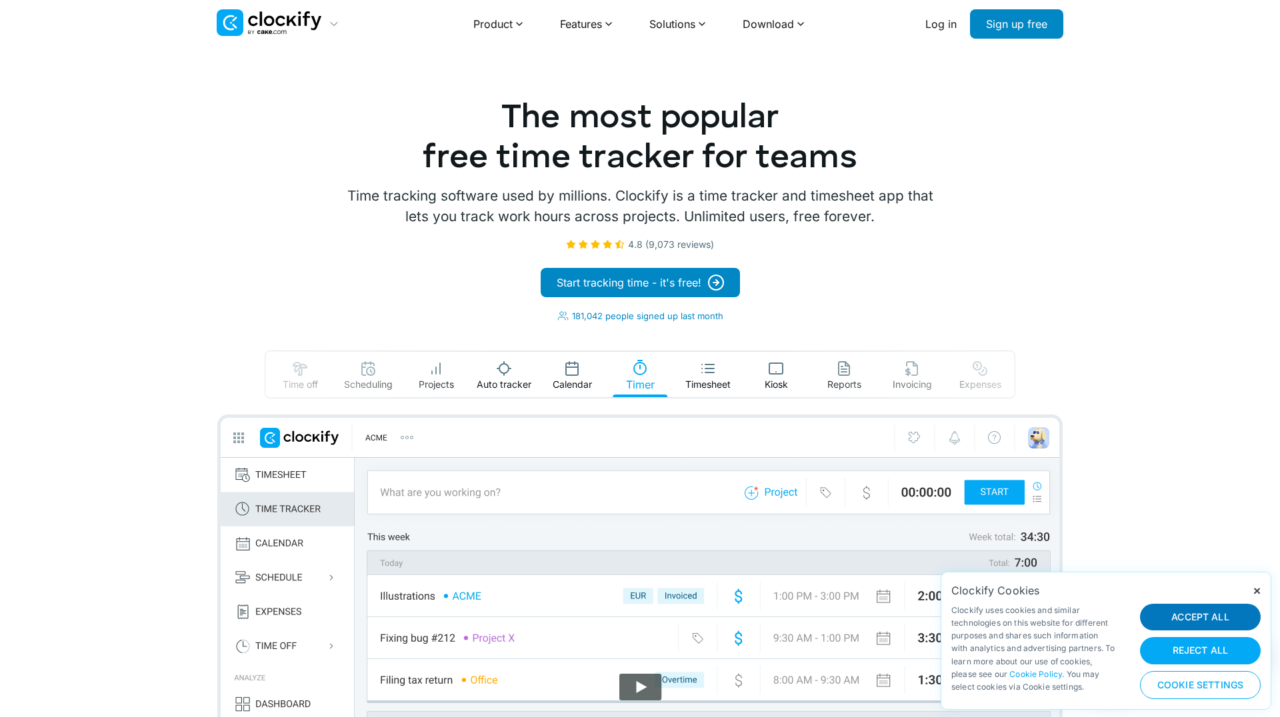

Clockify is a time tracking and timesheet platform for individuals and teams, offering unlimited users for free plus advanced features for project, budget, and attendance tracking.
After analyzing Clockify in depth and comparing it to other leading time tracking tools, this review lays out how it actually performs in real teams. If you are just starting to explore options, it also helps to look at broader time tracking software comparisons on CX Everywhere so you can see where Clockify fits in the landscape.
Clockify is one of the best-known names in time tracking, widely adopted by freelancers, agencies, and companies that want a simple way to log hours and build timesheets. Its popularity is driven by a generous free plan and a clean interface, but that does not automatically mean it is the right fit for every business model or workflow.
In this review, you will learn Clockify’s main strengths and weaknesses, how its features work in practice, and what kinds of organizations get the most value from it. We will look at timekeeping, budgeting, planning, reporting, and attendance, and also call out the scenarios where a more specialized system might be a better choice.
This article is written for founders, operations leaders, finance teams, and team managers in small to mid-sized organizations that need structured time tracking without jumping straight into heavyweight HR or project management suites. If your core problem is understanding who worked on what and for how long, Clockify is designed to sit at the center of that workflow.
Clockify Review Summary
Overall, Clockify is a strong, high-value option for teams that need reliable time tracking, basic attendance, and clear reporting around projects and billable work. The unlimited-user free plan and cross-platform apps make adoption easy, and the budgeting and planning modules provide enough structure for most small to mid-sized organizations.
Its tradeoffs are mainly at the edges: it does not replace dedicated project management, HR, or accounting tools, and very complex billing or approval workflows may feel constrained. For the majority of businesses that want straightforward, affordable time tracking with room to grow into more advanced features, Clockify is an excellent choice.
How We Review Tools and Assign the CX Score
We've developed a comprehensive scoring system to evaluate software tools objectively. Our CX Score (1.0–5.0) reflects how strong a product is within its category, based on hands-on testing and analysis across multiple criteria.
Core Functionality
Does the tool deliver the essential features users expect? We assess whether core capabilities meet category standards and if key features are accessible across pricing tiers.
Standout Features
We evaluate unique capabilities that go beyond the basics—features that make the product faster, more efficient, or offer additional value compared to competitors.
Ease of Use
How intuitive is the interface? We consider design quality, mobile apps, templates, and whether complex tasks feel simple to execute.
Onboarding
We measure how quickly new users can get productive with minimal training. High-scoring tools require little to no external support to get started.
Integrations
We assess native integrations, third-party connections, and API access. Tools that connect easily with common tech stacks score higher.
Customer Support
How easy is it to get help? We evaluate support channels, response times, and quality of documentation. Real-time human support scores best.
Value for Money
We compare pricing against features delivered. Software that offers more functionality at competitive prices receives higher marks.
Features of Clockify
- Real-time timers
- Manual time entry
- Weekly timesheets
- Project and client tracking
- Billable vs non-billable rates
- Budgeting by project or client
- Resource planning and capacity
- Attendance and overtime tracking
- Kiosk clock-in app
- Basic payroll support from time data
- Custom tags or categories
- Reporting and analytics
- Data export to CSV or PDF
- Mobile apps (iOS and Android)
- Desktop apps (Windows, Mac, Linux)
- Browser extensions
- API access
- User roles and permissions
- SSO/advanced security
- Invoicing module
- Full HRIS functionality
- Built-in project task management with dependencies
- On-premise deployment
Flexible Time Tracking for Projects and Tasks
Clockify’s core capability is tracking time against projects, clients, and tasks through timers or manual entries. Users can start and stop a timer as they work or log time after the fact, assigning entries to structured projects and activities. This makes it easy for teams to move away from ad hoc spreadsheets and capture time in a consistent, searchable format that supports invoicing and internal reporting.
Compared with many time trackers, Clockify’s flexibility across timer, manual entry, and weekly timesheets stands out. It accommodates different working styles, from developers who prefer live timers to consultants who fill in their week retroactively, without forcing a single rigid workflow.
Budgeting and Cost Tracking for Clients and Projects
Clockify allows you to set budgets for clients or individual projects, then track logged hours and estimated costs against those limits. As team members record time, managers can quickly see whether work is staying within agreed budgets, which clients are becoming unprofitable, and which projects are consuming more effort than expected.
While not as complex as a full PSA system, this budgeting layer is more than most basic time trackers provide. It gives agencies and service businesses a practical way to maintain margin awareness, especially when combined with billable rates and cost calculations.
Resource Planning and Capacity Visibility
The Planning module helps managers schedule work and see team capacity at a glance. By mapping assignments to people and time periods, you can spot over- or under-utilization and shift workloads before bottlenecks appear. This is particularly useful for project-based teams juggling multiple clients and deadlines.
Compared to dedicated project management tools, Clockify’s planning features are intentionally lighter, focusing on high-level resourcing rather than task-level dependencies. For many small to mid-sized teams, this strikes a useful balance: enough structure to plan capacity, without the overhead of full Gantt or portfolio management.
Attendance, Overtime, and Kiosk Clock-In
Clockify includes attendance tracking so you can monitor when employees start and end their workdays, track overtime, and support basic time and attendance compliance. The kiosk app turns a shared device into a clock-in station where employees punch in and out, which is ideal for offices, retail, or production environments.
This means organizations can cover both project-based time tracking and classic punch-clock needs in a single system. It is not a full HR or workforce management suite, but for many businesses it eliminates the need for a separate attendance tool.
Insightful Reporting and Exports
Reporting in Clockify lets managers and finance teams filter and aggregate time data by user, project, client, tag, and date range. You can generate summaries of billable versus non-billable hours, costs, and utilization, then export those reports in formats suitable for clients, accounting, or internal dashboards.
These built-in reports are stronger than many lightweight trackers, giving non-technical users direct access to the metrics they care about without needing a separate BI tool. For more advanced analytics, exports can serve as a data source for external systems.
Payroll and Billing Support from Time Data
By capturing hourly rates and employee cost data, Clockify can estimate payroll amounts and support internal cost tracking for hourly staff and contractors. Time entries can be grouped by pay period and exported for use in payroll systems, reducing manual work for HR or finance teams.
While it does not replace a dedicated payroll or accounting platform, this feature set closes the loop from time tracking to payments and billing, which is where many simpler tools stop. It allows smaller organizations to keep their tooling lightweight while still maintaining accurate cost data.
Cross-Platform Apps for Any Work Environment
Clockify provides native desktop apps for Mac, Windows, and Linux, mobile apps for iOS and Android, browser extensions, and a web app, plus a kiosk mode for shared devices. All apps sync with the same cloud backend so that time tracked on a phone appears instantly on the web dashboards.
This breadth of coverage is a significant advantage over web-only tools. It ensures that field workers, office staff, and remote teams can all track time in the context of their actual work environment, increasing adoption and data quality.
Clockify emphasizes a low-friction experience, which is one of the big reasons it has spread so widely. New users can sign up quickly, start a timer, and assign it to a project with minimal configuration. The interfaces across web, desktop, and mobile are clean and consistent, and most users report almost no learning curve beyond understanding how their organization has named projects and tasks.
For administrators, the main work lies in setting up clients, projects, tasks, and user permissions in a way that reflects how the business actually operates. As the organization grows, this structure needs occasional housekeeping to avoid clutter, but day-to-day usage remains straightforward. Documentation and support are readily available, and the 24/7 human support model with fast response times reduces risk during rollout or when you make configuration changes.
Clockify connects with a range of other tools through browser extensions, app integrations, and an API. The browser extensions enable users to start and stop timers directly from popular project management and productivity tools, reducing context switching. This is particularly valuable for teams working in platforms like Jira, Trello, or other task systems where they already spend most of their day.
There is also an API and support for exports, which allows more technical teams to pull time data into their own reporting, billing, or HR systems. However, integration needs vary widely by organization, so buyers should validate that their key tools are supported at the plan level they intend to use and confirm whether any required integrations are considered premium features. If deep, two-way integrations with ERP or accounting platforms are critical, it is worth testing those flows during a trial period.
Clockify Overview
Pros
- Unlimited users on the free plan, ideal for growing teams
- Very easy for non-technical users to start tracking time
- Strong coverage across web, desktop, mobile, browser, and kiosk
- Includes budgeting, planning, and attendance beyond basic timers
- Robust reporting and exports for projects, clients, and costs
- Good fit for agencies, consultancies, and project-based teams
- 24/7 human support with fast response times and high satisfaction
- High reliability with a published 99.99 percent uptime level
- Scales from freelancers to larger teams without immediate replatforming
- Large user base and strong external ratings validate product maturity
Cons
- Not a full replacement for advanced project management or HR suites
- Complex billing or multi-entity accounting still requires external tools
- Advanced controls and some integrations may require paid plans
- Data structure can get messy without disciplined project and tag setup
- Limited as a standalone analytics solution for sophisticated BI needs
Clockify: Frequently Asked Questions
What type of companies is Clockify best suited for?
Clockify is best for freelancers, agencies, and small to mid-sized businesses that need straightforward time tracking, project visibility, and basic attendance or payroll support.
Can Clockify handle both project time tracking and attendance?
Yes, Clockify allows users to track project-based time and also offers attendance and overtime tracking, including a kiosk app for clocking in and out.
Does Clockify replace payroll or accounting software?
No, Clockify focuses on time and cost tracking; it can help calculate payroll amounts and billable totals, but you will still rely on separate payroll or accounting systems for payments and financial reporting.
How easy is it to roll out Clockify to a whole team?
Implementation is generally quick, since users only need to learn how to track time and select the right projects or tasks. The main setup work is for admins to create a clear structure of clients, projects, and tags.
Is Clockify suitable for remote and distributed teams?
Yes, Clockify works well for distributed teams thanks to its web app, mobile apps, desktop apps, and browser extensions, with all data synced in the cloud for centralized reporting.
Does Clockify work offline?
The desktop and mobile apps can capture data when offline and sync when a connection returns, but buyers should test offline behavior for their specific devices and workflows.
Can Clockify integrate with other tools we already use?
Clockify offers browser extensions, integrations, and an API so you can connect it to project management, issue tracking, and other systems, though the depth of integration depends on the specific tool and plan.
How does Clockify help control project budgets?
You can set budget limits at the project or client level and monitor logged time and estimated costs against those limits, allowing managers to spot over-servicing before it impacts margins.
