
Homebase Review: All‑in‑One Scheduling, Time Tracking & Payroll Software
 Feb 10,2026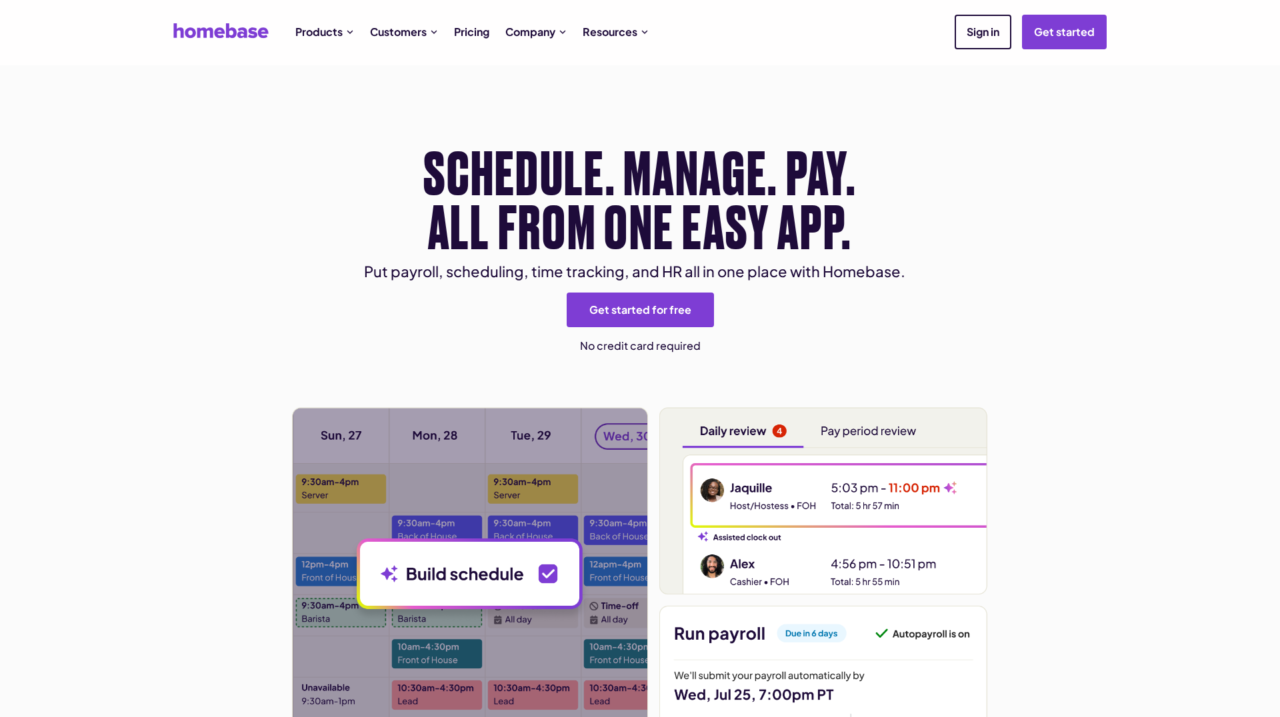

Homebase is an all‑in‑one scheduling, time tracking, payroll, and HR platform built for small businesses that employ hourly workers across retail, restaurants, and services.
After analyzing Homebase across scheduling, time tracking, payroll, and HR workflows, this review breaks down how well it actually serves small businesses with hourly teams. The goal is to help you decide if it is the right workforce platform for your shop, restaurant, or service business.
If you are still comparing options across the broader landscape of employee scheduling and time tracking tools, start with our main guide in the employee scheduling and time tracking software category on CX Everywhere, then come back here for a deeper look at Homebase specifically.
Homebase is widely known in the small business world, especially among restaurants and retailers, but popularity alone does not answer whether it fits your specific needs, budget, and team structure. Many owners hear about it from peers or app store reviews and want a more complete picture than marketing copy can provide.
In this review, you will learn the core pros and cons, where Homebase is strongest versus typical alternatives, and which use cases it serves best. It is primarily targeted at small businesses with hourly employees who need to schedule shifts, capture accurate hours, and run payroll without becoming HR experts. At its core, Homebase aims to simplify the full journey from clock-in to payday so managers can spend more time on operations and less on admin.
Homebase Review Summary
Overall, Homebase is a strong, pragmatic choice for small businesses that run on hourly labor and want to bring scheduling, time tracking, and payroll into a single, easy-to-use platform. Its biggest value lies in the connected workflow from schedule creation to time clocks to payroll, backed by simple mobile apps and automation that cut down on manual work. For owners and managers who are not HR or payroll specialists, that end-to-end coherence can be a major relief.
However, Homebase is intentionally not an enterprise HCM platform. If you need advanced global payroll, complex union or compliance rules, or deep HR modules like performance management, you will quickly hit the limits of what it is designed to do. For the typical independent restaurant, retailer, or service business, though, it offers a well-balanced mix of capabilities that improve accuracy, save time, and make everyday scheduling and payroll more manageable.
How We Review Tools and Assign the CX Score
We've developed a comprehensive scoring system to evaluate software tools objectively. Our CX Score (1.0–5.0) reflects how strong a product is within its category, based on hands-on testing and analysis across multiple criteria.
Core Functionality
Does the tool deliver the essential features users expect? We assess whether core capabilities meet category standards and if key features are accessible across pricing tiers.
Standout Features
We evaluate unique capabilities that go beyond the basics—features that make the product faster, more efficient, or offer additional value compared to competitors.
Ease of Use
How intuitive is the interface? We consider design quality, mobile apps, templates, and whether complex tasks feel simple to execute.
Onboarding
We measure how quickly new users can get productive with minimal training. High-scoring tools require little to no external support to get started.
Integrations
We assess native integrations, third-party connections, and API access. Tools that connect easily with common tech stacks score higher.
Customer Support
How easy is it to get help? We evaluate support channels, response times, and quality of documentation. Real-time human support scores best.
Value for Money
We compare pricing against features delivered. Software that offers more functionality at competitive prices receives higher marks.
Features of Homebase
- Employee scheduling
- Time clock and attendance tracking
- Digital timesheets
- Built-in payroll processing
- Team communication and messaging
- Hiring and onboarding tools
- AI-assisted scheduling and workflows
- Mobile apps (iOS and Android)
- Multi-location support
- Basic HR and employee records
- Shift swapping and availability management
- OT, breaks, and labor compliance tracking
- Reporting and labor cost insights
- Open API
- Enterprise-grade performance management
- Global payroll support
- On-premise deployment
Smart Shift Scheduling That Accounts for Real-World Constraints
Homebase’s scheduling engine is built around the realities of hourly work: changing availability, different roles, and the need to control labor costs. Managers can build schedules in minutes by dragging and dropping shifts, while the system factors in who is available, what roles they can cover, and how scheduled hours impact projected labor spend. This reduces both scheduling errors and last-minute scrambles to fill shifts.
Compared with generic calendar tools, Homebase provides shift-aware views, easy copying of previous weeks, and built-in handling of time off and shift swaps. That makes it more practical for busy managers who need a purpose-built schedule rather than a simple date-and-time grid.
Time Clocks That Feed Directly Into Digital Timesheets
Employees clock in and out using Homebase time clocks, typically via mobile apps, tablets, or other supported devices. The system tracks hours, breaks, and overtime automatically and applies basic rules to ensure data quality. Because all of this is tied to specific scheduled shifts, managers can quickly spot late arrivals, missed punches, or unauthorized overtime.
All captured time flows into digital timesheets without manual transcription, significantly reducing the chance of error compared with paper timecards or disconnected punch systems. Managers can review and approve these timesheets before running payroll, ensuring that corrections are made once instead of multiple times across different systems.
Payroll That Uses Your Existing Hours, Wages, and Tips
Homebase’s payroll capability is tightly integrated with its time tracking and timesheets. Once timesheets are approved, payroll runs can be processed quickly using stored wage rates, tax calculations, and tip data. This integration helps avoid the common problem of re-keying hours into a separate payroll system, which is both slow and error-prone.
For small businesses that previously exported CSV files into payroll or even calculated pay manually, having a direct flow from time clock to paychecks is a major upgrade. It brings more consistency to pay runs and reduces the risk of underpaying or overpaying employees due to manual mistakes.
Built-In Team Communication Around Schedules and Shifts
Homebase includes team communication tools designed around shift-based work. Managers can send company-wide announcements, shift-specific updates, or one-to-one messages directly through the platform, and employees can receive notifications about schedule changes, new shifts, or important updates on their phones.
This embedded communication reduces reliance on group texts, email threads, or external messaging apps that are not connected to the schedule. In day-to-day operations, that means fewer misunderstandings about who is working when, and a clearer channel for managers to keep teams informed.
Hiring and Onboarding Tools for Hourly Roles
Homebase offers hiring and onboarding capabilities that specifically target hourly positions. Managers can post jobs, track applicants, and manage simple pipelines, then move successful candidates into onboarding flows with digital forms and checklists. This helps standardize how new hires are brought into the business, ensuring that key compliance and documentation steps are not overlooked.
While it will not replace a full applicant tracking system for complex recruiting operations, it gives small businesses the essentials required to manage recurring hiring for hourly roles, all tied back to the same system they use for scheduling and payroll.
AI-Assisted Workflows Across Scheduling, Time, and HR Tasks
Homebase’s AI Assistants aim to remove friction from repetitive tasks like building schedules, checking for potential compliance issues, and guiding hiring or onboarding steps. By learning from your existing patterns and constraints, they can suggest schedules, flag anomalies in timesheets, or recommend next steps in setup and HR workflows.
Compared to traditional tools that rely entirely on manual input, these AI features can meaningfully reduce the time managers spend making routine decisions. They are especially helpful for owner-operators who manage HR tasks on top of running day-to-day operations and need a system that does more of the thinking for them.
Homebase is intentionally designed for non-technical small business owners and frontline managers. The interface is clean and task-oriented, with clear flows for building schedules, reviewing timesheets, and running payroll. Many users report being able to get up and running without formal training, largely because the workflows mirror existing manual processes, just in a digital format.
Implementation typically involves setting up locations, roles, employees, and basic timekeeping and payroll settings. For a single-location business, this can be completed relatively quickly, and employees can start clocking in via mobile or on-site devices soon after. Once configured, day-to-day tasks like adjusting schedules, approving time, and communicating with staff are straightforward, making adoption easier for teams that may not be used to business software.
Homebase’s core value proposition comes from its own integrated modules for scheduling, time tracking, timesheets, payroll, team communication, and hiring, which work together without requiring separate add-ons. It also supports popular platforms and devices for time clocks through its web and mobile apps, covering standard operating systems like iOS, Android, and major desktop environments.
For buyers with more advanced requirements or existing systems, it is important to verify specific integrations such as accounting or external payroll services during evaluation. While Homebase often connects to broader small business ecosystems, the level of integration can vary, so prospective customers should confirm whether their current tools can exchange data smoothly with Homebase or whether they will primarily rely on Homebase as the central system of record for workforce management.
Homebase Overview
Pros
- End-to-end workflow from scheduling to payroll tailored to hourly teams
- Very easy for non-technical managers and staff to adopt
- Strong automation around time tracking, timesheets, and wage calculations
- Built specifically for small businesses like restaurants and retail
- Integrated team communication reduces reliance on separate messaging apps
- Hiring and onboarding tools streamline bringing new hourly staff onboard
- AI Assistants help generate schedules and flag issues proactively
- Widely used with strong app store ratings and social proof
Cons
- Feature depth is lighter than full enterprise HCM suites
- Best suited to small, hourly teams, less ideal for complex enterprises
- Hiring and ATS capabilities are more basic than dedicated recruiting tools
- Businesses with predominantly salaried or remote staff may see limited benefit
Homebase: Frequently Asked Questions
What type of businesses is Homebase best for?
Homebase is best for small businesses that rely on hourly workers, such as restaurants, retail shops, salons, fitness studios, childcare centers, and local services with one or a few locations.
Is Homebase suitable for large enterprises or complex organizations?
Homebase is primarily designed for small businesses and simple hourly-work environments, so large enterprises with complex HR or global payroll requirements will likely find it too limited.
Can Homebase handle both scheduling and payroll in one system?
Yes, Homebase connects scheduling, time clocks, and timesheets directly into its payroll module so you can run payroll based on approved hours without re-entering data.
Do employees need special hardware to use Homebase?
No, employees typically use the Homebase mobile app or a tablet or computer time clock; it supports common web and mobile platforms rather than proprietary hardware.
How steep is the learning curve for managers using Homebase?
The learning curve is generally low; most managers familiar with spreadsheets and basic apps can set up schedules, track time, and approve payroll after a short onboarding period.
Does Homebase replace a full HR suite?
Homebase covers essential HR for hourly teams, like basic records, hiring, and onboarding, but it is not a full enterprise HR suite with advanced performance, learning, or complex benefits modules.
