
Rippling Review: Unified HR, IT and Finance Platform for 2026
 Jan 08,2026

Rippling is a unified workforce management platform that combines HR, payroll, IT and finance in a single system, aimed at fast-growing small to mid-market companies.
I have evaluated Rippling across multiple implementations where HR, IT and finance teams needed to move from a patchwork of tools to a single operational backbone. This review distills those experiences into a practical assessment of where Rippling excels, where it falls short, and how it compares to the broader market for workforce management and HR software.
If you are still exploring the space more broadly, start by looking at our comparison of workforce management and HR software tools on CX Everywhere, which sets the context for how platforms like Rippling stack up against traditional HRIS and payroll providers.
Rippling has grown quickly in popularity because it promises to centralize HR, payroll, IT and finance operations on one unified data platform. That pitch resonates with fast-growing companies drowning in manual onboarding, app provisioning, payroll changes and expense admin, but it also raises questions about tradeoffs vs best-of-breed tools.
In this review, you will get a clear breakdown of Rippling’s pros and cons, its key features, which types of organizations it fits best, and where you may want to consider alternatives. The focus is on practical guidance for operations, HR, IT and finance leaders at small to mid-sized companies who are deciding whether to bet on a unified platform or stay with a more fragmented stack.
At its core, Rippling aims to solve the problem of scattered employee data and disconnected workflows. By making the employee record the backbone for HR, IT and finance processes, it can automate onboarding, offboarding, payroll, access, devices and spend in ways traditional HR systems were never designed to handle.
Rippling Review Summary
Overall, Rippling is one of the most capable unified workforce platforms on the market for mid-sized, growth-oriented companies. Its biggest strengths are the breadth of modules across HR, IT and finance, and the automation engine that ties them together, especially for distributed or global teams. When implemented thoughtfully, it can eliminate a large volume of repetitive admin work and reduce risk around access and compliance.
The main considerations are its relative complexity vs simpler HRIS tools, the need for cross-functional buy-in from HR, IT and finance, and the lack of simple self-serve pricing. If your organization is ready for a strategic platform that becomes the operational backbone for your people, Rippling is well worth a serious look; if you just need basic payroll and HR, you may be better served by a lighter solution.
How We Review Tools and Assign the CX Score
We've developed a comprehensive scoring system to evaluate software tools objectively. Our CX Score (1.0–5.0) reflects how strong a product is within its category, based on hands-on testing and analysis across multiple criteria.
Core Functionality
Does the tool deliver the essential features users expect? We assess whether core capabilities meet category standards and if key features are accessible across pricing tiers.
Standout Features
We evaluate unique capabilities that go beyond the basics—features that make the product faster, more efficient, or offer additional value compared to competitors.
Ease of Use
How intuitive is the interface? We consider design quality, mobile apps, templates, and whether complex tasks feel simple to execute.
Onboarding
We measure how quickly new users can get productive with minimal training. High-scoring tools require little to no external support to get started.
Integrations
We assess native integrations, third-party connections, and API access. Tools that connect easily with common tech stacks score higher.
Customer Support
How easy is it to get help? We evaluate support channels, response times, and quality of documentation. Real-time human support scores best.
Value for Money
We compare pricing against features delivered. Software that offers more functionality at competitive prices receives higher marks.
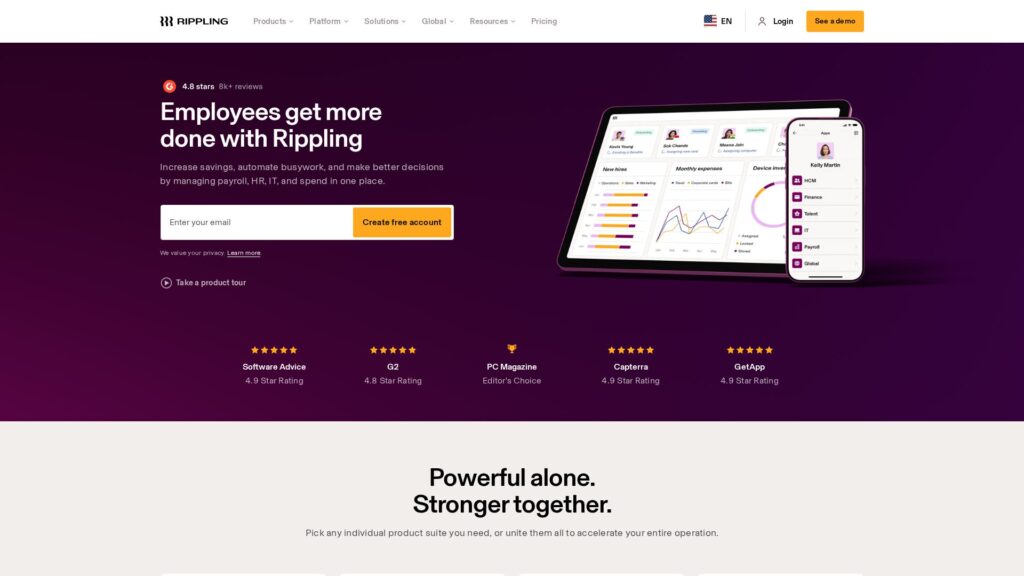
Features of Rippling
- Core HRIS
- Payroll Processing
- Global Payroll Support
- Time and Attendance
- Benefits Administration
- Applicant Tracking System (ATS)
- Performance Management
- Employee Self-Service Portal
- Mobile Apps (iOS and Android)
- Expense Management
- Corporate Cards
- Accounts Payable Automation
- Travel and Spend Controls
- Identity and Access Management (IAM)
- Single Sign-On (SSO)
- App Provisioning and Deprovisioning
- Device Management (MDM/Endpoint)
- Automation Rules and Workflows
- Multi-country Support (185+ countries)
- Multi-entity / Subsidiary Management
- Custom Reporting and Analytics
- Open API
- HR Document Management
- Onboarding and Offboarding Flows
- Compliance Management (tax, labor)
- Contractor Management and Payments
- PEO / Employer of Record Options
- Role-based Access Controls
- Two-Factor Authentication
- Integrations Marketplace
- Data Export Capabilities
- In-app Approvals and Workflows
- Learning Management
- Built-in CRM
- On-premise Deployment
Centralized Employee Record as the System of Truth
At the center of Rippling is a single employee record that stores HR, IT and finance attributes in one place. Rather than maintaining separate profiles in an HRIS, MDM, SSO and expense system, Rippling consolidates these into a unified graph. This matters because changes to someone’s role, department, location or employment status can drive automatic updates across payroll, app access, device policies and spending permissions without redundant data entry.
Compared with traditional HR platforms that bolt on integrations, this architecture gives Rippling a clear advantage in consistency and automation. It reduces the risk of orphaned accounts or misaligned permissions, which is particularly important for security-conscious or regulated organizations.
End-to-End HR and Payroll Management
Rippling covers the full HR lifecycle: recruiting via an ATS, offers and onboarding, core HR records, time and attendance, PTO management, benefits administration, performance cycles and document storage. Payroll runs on top of this data, handling regular runs, off-cycle payments, deductions and tax calculations, with support for both employees and contractors.
Because HR and payroll live on the same platform as IT and finance modules, onboarding flows can take a new hire from offer letter to being fully paid, enrolled in benefits, set up in time tracking and configured in payroll taxes automatically. This tight coupling is more advanced than what most mid-market HRIS tools offer out of the box.
Global Workforce and Multi-Entity Support
Rippling is designed to manage workforces across 185+ countries, handling onboarding, pay, and compliance for global employees and contractors. It supports local currencies and country-specific rules, enabling companies to centralize oversight while respecting local nuances. This can be a game-changer for organizations moving beyond a single country and struggling with disparate local payroll providers.
In comparison, many SMB HR and payroll tools are effectively domestic products with limited or bolt-on international coverage. Rippling’s global capabilities are not a replacement for a full enterprise HCM in the most complex multinational environments, but they are strong for mid-market and upper-SMB organizations.
IT Automation for Identity, Access and Device Management
One of Rippling’s standout differentiators is the IT suite, which includes identity and access management, app provisioning, SSO integration and device management. HR events like hiring, promotions or terminations can automatically trigger the creation or deletion of accounts across common SaaS apps, along with enforcing role-based access controls.
Device management extends this automation to laptops and other endpoints, allowing IT to enforce security policies, push configurations and track inventory from the same console that HR uses for people data. This level of integration between HR and IT is far beyond the norm for HR platforms, reducing both manual work and security risk.
Integrated Spend Management and Corporate Cards
Rippling’s finance suite adds corporate cards, expense management, accounts payable and travel controls on top of the workforce platform. Because card limits and policies can key off employee attributes like department, level or location, finance teams can manage spend programmatically rather than manually adjusting settings in a standalone card tool.
For companies that currently use a patchwork of expense and card providers, consolidating spend management within Rippling can simplify reconciliation and visibility. While dedicated card and expense platforms may have more niche features, the benefit here is tight linkage to HR data and automation.
Automation Engine and Policy-Based Workflows
Rippling offers a flexible automation engine that lets admins define policies and workflows triggered by events or conditions on the employee record. Examples include automatically assigning specific apps to engineers in a particular office, sending tailored onboarding tasks to new managers, or revoking access and disabling devices instantly on termination.
This policy-driven approach reduces reliance on manual checklists and ensures consistency, especially as organizations scale or expand globally. Many HR platforms offer basic workflows, but Rippling’s cross-suite reach and granularity are more advanced than most mid-market competitors.
Analytics and Reporting Across Functions
Because HR, IT and finance data are unified, Rippling can offer cross-functional reporting that is difficult to replicate with separate tools. You can analyze metrics like headcount, turnover, device inventory, app usage and spend per department or location from a single source.
While some dedicated BI or people analytics tools will still be more powerful at deep analysis, Rippling gives operational leaders an accessible, integrated view without heavy data engineering, which is a meaningful advantage over siloed systems.
Rippling’s interface is modern and generally intuitive for both employees and admins. Employees benefit from a single portal for HR tasks, devices and expenses, which reduces confusion compared with juggling multiple logins. Mobile apps support common self-service actions, making day-to-day use straightforward for distributed teams.
For administrators, there is a learning curve, especially when configuring advanced automations, multi-entity structures and IT or finance modules. Implementation typically requires cross-functional coordination between HR, IT and finance to design policies and workflows correctly. Once that groundwork is done, ongoing administration is efficient, but organizations should plan for a structured onboarding project rather than an ad hoc rollout.
Rippling integrates with a range of third-party tools across categories like collaboration, identity providers, accounting, recruiting sources, benefits carriers and security platforms. It is designed to serve as the people-data hub, pushing and pulling information to systems you choose to keep as best-of-breed. An API layer allows more technical teams to connect internal tools or build custom workflows when needed.
However, the exact integration coverage and depth can vary by region and module. Prospective buyers should map their critical systems, especially in accounting, security and core business applications, and validate that Rippling offers either native integrations or robust APIs for each. Given its broad scope, you should not assume every niche tool is supported out of the box, but the overall ecosystem is competitive for the mid-market workforce management segment.
Rippling Overview
Pros
- Unified platform covering HR, payroll, IT and finance in one system
- Powerful automation engine to drive policy-based workflows across functions
- Strong support for global workforces in 185+ countries
- Tight integration of identity, access and device management with HR data
- Modern, user-friendly interface and employee self-service portal
- Modular suites let companies adopt capabilities gradually as they grow
- Cross-functional analytics combining HR, IT and spend data
- Can reduce tool sprawl by replacing multiple point solutions
Cons
- Quote-based pricing makes cost comparison less transparent
- Implementation and configuration can be complex for smaller teams
- May be more platform than very small, domestic businesses need
- Broad scope can create internal resistance from teams wedded to point tools
- Depth of some niche features may trail dedicated best-of-breed apps
Rippling: Frequently Asked Questions
What type of companies is Rippling best suited for?
Rippling is best for fast-growing small and mid-sized organizations that want to centralize HR, payroll, IT and finance operations on one platform, especially if they have distributed or global teams.
Does Rippling support global employees and contractors?
Yes, Rippling can onboard, pay and manage workers in over 185 countries, making it suitable for companies expanding beyond a single country.
Can we implement only HR and payroll without the IT or finance modules?
Yes, Rippling is modular, so you can start with HR and payroll and later add IT or finance suites as your needs evolve.
How difficult is it to implement Rippling?
Basic deployments are manageable, but full use of HR, IT and finance automation requires a structured implementation project and coordination between multiple departments.
Does Rippling replace our existing device management and identity tools?
In many cases, yes. Rippling’s IT suite can handle identity, SSO integration, app provisioning and device management, but you should compare its capabilities with any existing best-of-breed tools you rely on.
Can Rippling integrate with our existing accounting and business systems?
Rippling offers integrations and APIs to connect with popular accounting and business applications, though you should validate specific systems and integration depth during evaluation.
Is Rippling a good fit for very small businesses that just need payroll?
It can work, but very small, price-sensitive businesses that only need basic payroll may find simpler, payroll-only tools easier and more cost-effective.
How does Rippling help with security and compliance?
By tying access, app provisioning and device management to the employee record, Rippling can automatically enforce security policies, reduce orphaned accounts and keep compliance tasks aligned with HR changes.
