
TimeTap Review: Online Appointment Scheduling Software for Teams
 Mar 19,2026

TimeTap is an online appointment scheduling platform designed for businesses that need multi-staff calendars, automated messaging, and basic client management in one system.
After evaluating TimeTap in the context of modern scheduling tools, this review distills how it actually performs for real teams managing appointments at scale. The goal is to help you understand where it fits among other online appointment scheduling software options and whether it matches your operational reality.
If you are still exploring the broader landscape of scheduling and booking platforms, you may also want to compare it against other solutions in our wider coverage of appointment and booking tools on CX Everywhere. That broader view is helpful if you are deciding between lightweight solo schedulers and more robust team-focused systems like TimeTap.
TimeTap has built a reputation as a feature-rich appointment scheduling solution for organizations rather than just individuals. Many teams encounter it when simple calendar links stop working for multi-staff, multi-location, or class-based scheduling. Even so, it warrants a closer look to understand its strengths, tradeoffs, and how it behaves in day-to-day use.
In this review, you will learn its core pros and cons, key features such as multi-staff calendars, automation and client intake, and which business sizes and use cases it serves best. It is particularly relevant for service-based businesses, clinics, educational programs and field-service teams that need predictable schedules, fewer no-shows and better visibility into staff availability.
At its core, TimeTap solves the problem of coordinating people, places and time. It lets clients book appointments online, routes them to appropriate staff, fills cancellations via waitlists and keeps everyone in sync through automated communication and calendar updates. That makes it a practical scheduling backbone for teams that can no longer rely on shared inboxes and ad hoc spreadsheets.
TimeTap Review Summary
Overall, TimeTap is a strong fit for organizations whose scheduling needs have outgrown simple booking links but who do not want the overhead of a full-blown practice management suite. Its combination of multi-staff scheduling, automated messaging, waitlists and basic client profiles creates a solid operational foundation for appointment-centric businesses.
However, it remains a focused scheduling platform rather than an all-in-one system. If you need deep CRM, marketing automation or advanced analytics, you will likely pair TimeTap with other tools. For many clinics, education providers and service teams, that is an acceptable and even preferable division of labor, making TimeTap a pragmatic cornerstone in a broader tech stack.
How We Review Tools and Assign the CX Score
We've developed a comprehensive scoring system to evaluate software tools objectively. Our CX Score (1.0–5.0) reflects how strong a product is within its category, based on hands-on testing and analysis across multiple criteria.
Core Functionality
Does the tool deliver the essential features users expect? We assess whether core capabilities meet category standards and if key features are accessible across pricing tiers.
Standout Features
We evaluate unique capabilities that go beyond the basics—features that make the product faster, more efficient, or offer additional value compared to competitors.
Ease of Use
How intuitive is the interface? We consider design quality, mobile apps, templates, and whether complex tasks feel simple to execute.
Onboarding
We measure how quickly new users can get productive with minimal training. High-scoring tools require little to no external support to get started.
Integrations
We assess native integrations, third-party connections, and API access. Tools that connect easily with common tech stacks score higher.
Customer Support
How easy is it to get help? We evaluate support channels, response times, and quality of documentation. Real-time human support scores best.
Value for Money
We compare pricing against features delivered. Software that offers more functionality at competitive prices receives higher marks.
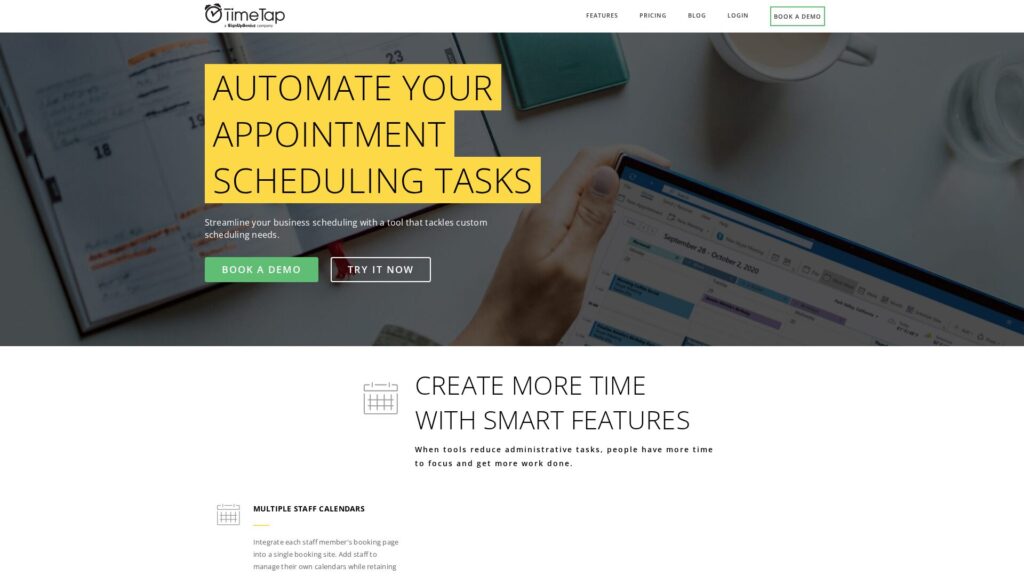
Features of TimeTap
- Online booking pages
- Multi-staff scheduling
- Multi-location support
- Automated email reminders
- Automated SMS reminders
- Custom booking forms
- Client profiles / lightweight CRM
- Automated waitlists
- Class and group bookings
- Two-way calendar sync
- Google Maps travel time calculation
- Central admin dashboard
- Custom email templates
- Calendar buffers and rules
- Payment processing
- Open API
- Zapier integration
- Mobile-friendly booking pages
- Reporting and analytics
- Role-based permissions
- Embeddable booking widget
Centralized Multi-Staff Scheduling for Teams
TimeTap lets organizations integrate each staff member’s booking page into a single unified booking site, while still preserving individual ownership of calendars. Administrators can add staff, configure their availability and services, and maintain a clear overview of appointments and coverage using a single organization login. This centralization is particularly valuable for clinics, departments, or training programs that need to balance demand across multiple providers or instructors.
Compared with tools that only focus on single users, this approach reduces the chaos of separate links and disparate calendars. Clients can select the right person or the earliest available slot, while back-office teams gain the visibility required for capacity planning and resource allocation.
Automated Messaging to Reduce No-Shows and Manual Follow-Up
TimeTap goes beyond basic appointment reminders with customizable automated text and email messaging. You can configure reminders, post-appointment follow-ups, next-step instructions, and long-term nudges such as annual checkup reminders. Each message can be tailored to the appointment type and timing, allowing you to maintain a consistent client experience without manual outreach.
This level of automation helps cut down no-shows, improves preparation before appointments, and keeps clients engaged between visits. Many competing tools offer reminders but fewer allow granular control over multiple message types and schedules, which is where TimeTap stands out for operations-minded teams.
Custom Booking Forms and Client Profile Storage
With TimeTap, businesses can design custom booking forms to capture the exact information required before an appointment, from basic demographics to service-specific questions. When a new client books, the platform automatically creates a client profile and stores this information either in their profile or the appointment record.
This lightweight CRM capability means you can quickly reference past information and bookings without maintaining separate spreadsheets. While it will not replace an enterprise CRM for complex sales cycles, it provides sufficient client context for most appointment-driven workflows and keeps scheduling and client data tightly linked.
Automated Waitlists for Classes and Group Sessions
For organizations that run classes, workshops, or group sessions, TimeTap includes an automated waitlist feature. When a session reaches capacity, additional registrants can join a waitlist. If a registrant cancels and a seat becomes available, the system can automatically send a booking invitation to people on the waitlist according to your settings.
This automation helps ensure that classes run as full as possible, protecting revenue and improving utilization without requiring staff to manually call or email through a list. Many basic scheduling tools lack this depth for group-based scheduling, making TimeTap a stronger option for training providers and class-based services.
Two-Way Calendar Sync to Prevent Double-Bookings
TimeTap supports two-way calendar sync between its own scheduler and your work email calendar. When a time slot is booked in your email calendar, TimeTap automatically updates your availability, and bookings made via TimeTap appear in your external calendar as well. This prevents double-bookings and removes the need for staff to reconcile multiple calendars manually.
In real-world use, this is essential for professionals who manage both internal meetings and client appointments. Compared to tools that only offer one-way feeds, TimeTap’s two-way sync does a better job of making sure calendars are authoritative and up to date in both directions.
Travel Time Calculation for On-Site Appointments
For teams that travel between appointment locations, TimeTap integrates with Google Maps to calculate commute time between bookings. The system automatically adjusts staff availability to include the required travel time, preventing back-to-back appointments that would be physically impossible to attend.
This feature matters for home health visits, field service providers, consultants and any role where on-site work is the norm. While some schedulers address this with static buffers, TimeTap’s use of location-aware travel calculations provides a more realistic and operationally sound schedule.
Lightweight Client Management Within a Scheduling Context
TimeTap’s approach to client management emphasizes what is necessary for scheduling workflows: profiles, contact details, appointment history and form responses. You get enough structure to support compliance, repeat visits and personalization without the overhead of a full CRM system.
In comparison to more marketing-centric platforms, this is deliberately focused and keeps the product simpler to run for operational teams. When paired with a dedicated CRM or practice management system, TimeTap comfortably serves as the scheduling and intake layer without trying to do everything.
Implementing TimeTap involves defining services, staff, availability rules, booking forms and messaging workflows. For a small solo operation this can feel more involved than point-and-click tools, but for teams the upfront configuration pays off in reduced day-to-day coordination. Admin users should plan a dedicated setup phase, especially if there are multiple locations or complex service rules.
Once configured, everyday use for staff is straightforward: they work primarily from their calendars and appointment lists while automated reminders and waitlists run in the background. Clients interact through simple booking flows that collect necessary information up front. Non-technical users can usually manage day-to-day operations after brief onboarding, although advanced automation and form design may still require an internal “power user.”
From the information available, TimeTap clearly integrates with external calendars and Google Maps, enabling two-way calendar sync and travel time calculations. These integrations are central to its value proposition, ensuring that staff availability reflects both internal events and on-the-ground logistics.
Like most modern scheduling platforms, it is reasonable to expect additional integrations or API options, but buyers should verify specifics such as CRM, payment, and communication tools before committing. If your organization relies heavily on a particular tech stack, it is worth confirming whether TimeTap offers native connectors, an open API, or webhooks to ensure it can slot cleanly into your existing workflows.
TimeTap Overview
Pros
- Strong multi-staff scheduling with centralized organizational control
- Robust automated email and text workflows beyond basic reminders
- Custom booking forms with automatic client profile creation
- Automated waitlists to keep classes and group sessions full
- Two-way calendar sync to reduce double-bookings
- Travel time calculation using Google Maps for on-site appointments
- Lightweight CRM features suitable for many appointment-driven teams
Cons
- More setup and configuration than simple solo scheduling tools
- Client management is lightweight compared with full CRM platforms
- Best value realized by teams, not minimal solo use cases
- Details on broader integrations and APIs are not immediately clear
TimeTap: Frequently Asked Questions
What type of businesses is TimeTap best for?
TimeTap is best for appointment-driven organizations such as clinics, professional services, education and training providers, and field-service teams that manage multiple staff and locations.
Can TimeTap handle multiple staff calendars under one account?
Yes, TimeTap is designed to integrate each staff member’s calendar into a single booking site while admins maintain visibility and control via one organizational login.
Does TimeTap help reduce no-shows?
Yes, TimeTap offers automated text and email messaging for reminders, follow-ups and long-term nudges, which helps reduce no-shows and missed appointments.
Can I collect custom information from clients when they book?
Yes, you can build custom booking forms and TimeTap will automatically create client profiles and store the captured information in their records.
Is TimeTap suitable for classes and group sessions?
Yes, TimeTap includes an automated waitlist feature that helps keep classes and group sessions full by inviting waitlisted clients when spots open.
How does TimeTap prevent double-bookings across calendars?
TimeTap uses two-way calendar sync, updating availability when appointments are booked either in your work email calendar or within the TimeTap scheduler.
Does TimeTap account for travel time between appointments?
Yes, TimeTap uses Google Maps to calculate commute time between different locations and adjusts availability to include travel time.
Is TimeTap a full CRM system?
No, TimeTap provides lightweight CRM capabilities focused on client profiles and appointment history, and is not a replacement for a full-featured CRM in complex sales or marketing environments.
